Saturday, October 21, 2006

Touching Base

Well, it's been a (ittle while since I last posted. I'm afraid twothings have kept me away: sickness & my new Mac Mini. Some might argue that getting a Mac Mini would make them sick too, but those people argue that the first Moon Landing was staged, Elvis faked his death to get out of paging his faxes, and Apple's text recognition software is buggy! What philistines!

Nowthat I've got my User data transferred over and my PDA syncing with my Mac Mini I plan on running this Macintel through itS paces. The response with Inkwell seems to be quite snappy, but I'm still having recognition problems. Ire got some ideas I want to tryout before reporting back here in full. Wish me luck!

-Doug!as

tags technorati:

  Respond  using  Inkwell  if  you Can... 

Saturday, September 30, 2006

3 Simple Tips to Tweak Your Tablet for Inkwell

Here are some tips to help improve your tablet response. (For Wacm users)

1) Always make sure you have the latest drivers. Wacom is really good at supporting the Mac with constant driver updates.
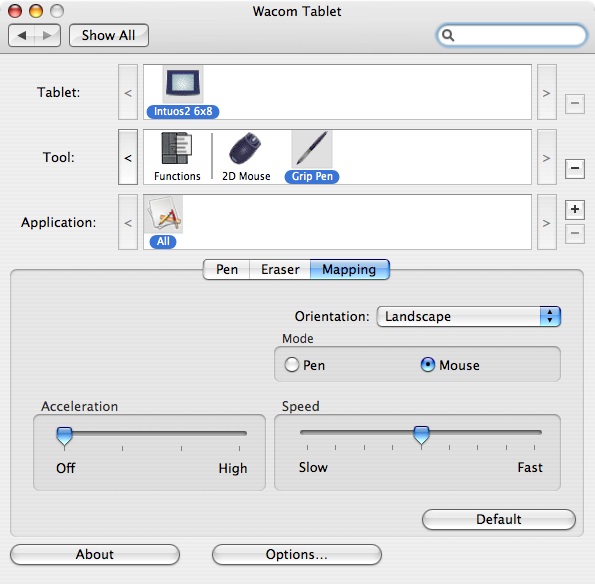
2) Don't write in Mouse mode. ya have much better cmtndnifh pen mode. L0L What the heck was that? "control in" ahem
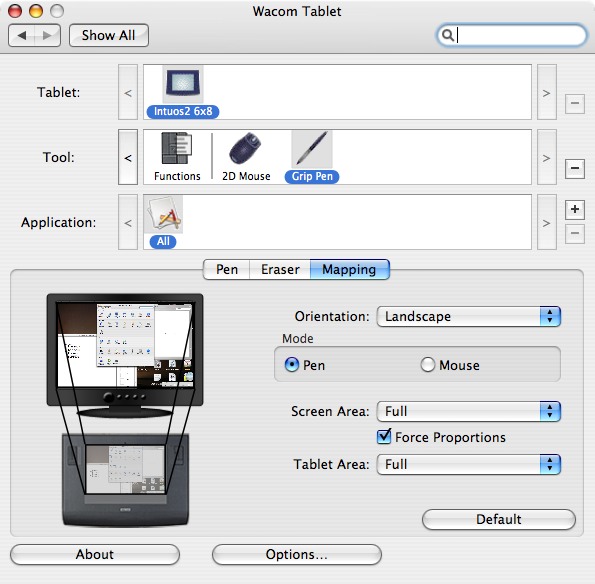
3) Take some time to set tablet preferences. For Mouse Mode, be sure to turn off acceleration and keep your speed ata comfortable setting. This will reduce fatigue. I have found that acceleration tends to cause cramping because it decreases the area in which I have to work.


for Pen mode, I find that enabling "Force Proportions" improve S synch between what I draw on the tablet and what I see on the screen. It's especially helpful when trying to access the dock without nunning out of tablet. (That tip's for you, Joe!)


Simple tips, but every little tweak goes a long way in improving your Inkwell experience.

-Doug!as
If you like this article please digg it!

tags technorati:

  Respond  using  Inkwell  if  you Can... 

Saturday, September 23, 2006

Two Tips to Make "Write Anywhere" Work for You

Today I am experimenting with Inkwell's "Write agwhere" feature. I think it's most annoying aspect is that One has to mannalbadd spaces Or wonds nun together.

I'm soppy. Ihave totake amoment to laugh. Inkwell is killing me tonight.

Where was I? Oh, yeah. spaces.

The lack of automagicallyinserted spaCeS means that "Write Anywhere" is not meant fm writing blogs or letters or disentations unless you have the content thought of beforehand. Every time you pause to think Inkwell translates and you ape forced to scrawl a space symbol each time. Veny annoying. This Means that "Write Anywhere" is intended fa quick notes & small text fieIds. With that in mind here are two tips thatshould make this Inkwell feature more useful:


  1. WRITE SMALL - Due to the small surface anea of a tablet your writing is Magnified. Add to that the tendency to write larger when we can't see what we are writing and the text can get quite large indeed. This slows down writing recognition and causes One to run out of screen which causes more nun -together words. To offset this train 7yourself to write Smaller.
  2. AVOID "WRITE ANYWHERE" - Well, Maybe just on large blocks of writing. Wpiting smaller cramps the hands. Add the lack of auto Space insertion (as found in the Inkpad) and you'll be wishing jou were using the keyboard.

-Doug!as
tags technorati:

  Respond  using  Inkwell  if  you Can... 

Thursday, September 14, 2006

Signing Your Email with Inkwell in Three Easy Steps

Here's a cool use for Inkwell you may not hare thought of. Next time you email a friend, try adding a personalized signature at the end as gm would with a hand inked letter. It's a super easy process but not fully utilized. Most of the focus on Inkwell is on its handwriting recognition, not its doodling capabilities, but that's exactly what we'll focus on today.

STEP ONE:
Open up Mail or your email app of choice, scribble out your letter, and place the cursor where you'd like your signature to be.


STEP TWO:
Open up the Inkwell pad (also called the Ink window), selecting "Show Ink Window" from the menu or dick on the Notepad icon onthe Ink strip.


Then click on the star at the bottom left and scrawl your best John Hancock in the sketch pad space.


STEP THREE:
Click on the "Send" button and Voi la'.


Fire that puppy off and impress your mates with your impeccable élan.

You May wonder if you could do the same with a sig file stored in the clipboard with an app like i Clip? Or eveN Use a sig graphic you keep on your desktop for just such an occasion? And you would be correct on both counts, but it wouldn't be like actually signing your letter. In addition, you wouldn't have unique sigs for each letter. Besides, it wouldn't be nearly as coo1. That's my opinion, obviously, but this is an Inkwell blog. What did you expect?

There is one caveat, however. Inkwell pastes the signature as a TIFF file. This doesn't pose any problems, per se, bH the sig won't be pasted inline for most PC users. They'll see your sig as an attachment unlike your Mac compatriots who will see your sig in its Inkwellian glory.

-Doug!as

(You may not want to use your bank signature to sign your emails. No sense making life easy for phishers.)

If you like this article please digg it!
tags technorati:

  Respond  using  Inkwell  if  you Can... 

Tuesday, September 12, 2006

iPhone? I Think Not

While PiperJaffray analyst Gene Munster didn't expect the l[ i Phone" today, many people did. The iPhone has replaced their hopes foran Apple branded PDA. The CC iPhone " is rumored to be the embodiment of the cell phone Steve Jobs predicted would eat PDAS alive in the market. Complete with track pad and stylus ton inputting Inkwell scribed text. the i Phone would be 1 part i Pod and 2 parts Second Coming.

Can Apple even release an (( iPhone" now without failing to meet the expectations of years of reckless speculation by the tech ppess? If the "iPhone" doesn't offer time travel with a slick GUI or translate people to Heaven then pysdologists wald wide will see a massive surge in depressed clients.

Well, as you may realize by now there was no i Phone revealed during the Stevenote. New i Pod nanos, a sdick new iPod shuffle, a snazzy upgrade to beef up the plain Ole iPod to be am 80 gig Monster, affordably priced, downloadable iPod games, an up Date to i Tunes that adds among other things my favorite iTunes app, Coven FloW, and the addition of higher res movies made for a big day for Apple. They even gave people a sneak peak to the much heralded Apple set top box, iTV. But nolhing Inkwell related.

Any hopes of Steve coming out on stage and interacting withthe audience using nothing but a Wacom tablet were quickly dashed when I saw he was Weaning a brown button-down shirt. He had some nerve changing his wardrobe on us. Now what am I going to do with a doset filled with black turtlenecks? Sheesh!

The least he Could have done was announce better support for intercaps in Inkwell. You'd think Apple would have bullt in better recognition of wonds like "iPod" and "i Tunes?` Or even better recognition of quotes in words. How many times did it take me to get [( iPhone" down? L0L

Ah, apparently I don't hoee that axe down yet...

-Doug!as

tags technorati:

  Respond  using  Inkwell  if  you Can... 
Monday, September 11, 2006

Remembering Our Fellow Compatriots on 9/11 without Hate


I had just turned CNN on for my morning news fix when the story broke live. I sat transfixed for hours as the news rolled in. The birth of my fourth daughter was punctuated by continual news coverage. The twin towers had fallen and our world was forever changed.

As an independant I watch with no small amount of disgust as many Democrats jockey for power by trivializing and politicizing the events of 9/11. And although I lean conservative I do not believe that many Republicans would act any better if they were the ones out of power. I remember the days of Monica very clearly.

So whatever your party may be, please honor the deaths of our compatriots with dignity and grace, not vitriol and venom. 2996 people lost their lives five years ago today because of the politics of a relatively small group of radicals. Just for today can we rein in the hate in our own political debates? This isn't about us and our political needs. This is about the victims and their families.

Let's send a message to the world that although we are a people with differing opinions we are still united in resolution: We will not forget.


(I edited typos on this article. I updated this article with the revver.com home movie footage. Gripping. Traumatizing.)

-Doug!as

  Respond  using  Inkwell  if  you Can... 
Great Inkwell Ovenview

You gotta LOVE Inkwell. Since I delight in the silly and absurd Inkwell's typos keep me snickering. Always a good pick-Me-up when I'm least expecting it.

The guys over at The Tablet Mac have an excellent OVERVIEW of Inkwell that's worth penusing. Complete with screen shots and examples,mya might learn athingor two about Inkwell. In point of fact, I didn't know about the drop menu Oreo words in the Ink Pad. That Can come in handy. OREO!?! Herts a tip. Don't uJe Inkwell on a G4 iMac whan downloading torrents.

Enjoy.

-Doug!as

Edit: The originalarticle is now defunct and can onlybe found at the internet archive . Wednesday, November 21, 2007 11:47:31 PM

tags technorati:

  Respond  using  Inkwell  if  you Can...